 fatafat
🚨 क्या आपको भी ये एरर आ रहे हैं?
"Upload Failed: File size exceeds limit."
"Image dimensions do not match required specifications."
"Signature not accepted. Please re-upload."
Agniveervayu 02/2027 पोर्टल पर ये एरर सबसे ज़्यादा फॉर्म रिजेक्ट करवाते हैं। महीनों की तैयारी के बाद एक छोटी सी तकनीकी गलती आपका फॉर्म reject करवा सकती है। इस गाइड में सटीक समाधान!
Agniveervayu और Indian Air Force की भर्ती प्रक्रिया 2026 में पहले से ज्यादा strict हो चुकी है। अब केवल साफ फोटो होना ही काफी नहीं है, बल्कि फोटो का फॉर्मेट, बैकग्राउंड कलर, स्लेट डिटेल्स, फाइल साइज़, सिग्नेचर और फोटो खींचने की तारीख (DOP) तक पूरी तरह नियमों के अनुसार होना जरूरी है। यही वजह है कि आजकल candidates Slate pakad ke photo editor online की तरफ तेजी से शिफ्ट कर रहे हैं।
इस ब्लॉग में हम स्टेप-बाय-स्टेप समझेंगे कि slate pakad ke photo क्या होता है, इसे ऑनलाइन कैसे एडिट करें, photo और signature का सही size क्या होना चाहिए, Airforce photo background colour 2026 क्या होना चाहिए और DOP full form in photo airforce क्यों जरूरी है।
📌 Current cycle: Agniveervayu Intake 02/2027
Intake 02/2027 के लिए registration 06 July 2026 से 26 July 2026 तक था और Phase-I online exam 22–23 September 2026 को scheduled है। 22 September 2026 को application window बंद है; नीचे दिए upload rules current 02/2027 cycle के हैं। अगली intake में rules बदल सकते हैं.
Agniveervayu Intake 02/2027 के लिए photo rules पिछले versions से अलग हैं। सबसे जरूरी बदलाव file-size ranges में है: current notice में photograph 100–200 KB, candidate signature 80–150 KB और left thumb impression 50–100 KB दिया गया है। Photo के लिए physical black slate requirement भी जारी है.
इस guide में हम slate pakad ke photo, DOP (Date of Photograph), background, signature, left thumb impression और online registration के दौरान होने वाले live image capture को simple words में समझेंगे.
Upload Photo → Add Name + DOP → Create Slate Preview
अपनी front-facing photo यहीं upload करें। Tool black slate को chest area में realistic board-style design के साथ जोड़ता है, फिर name + actual Date of Photograph लिखता है। Slate को drag, resize और rotate करके preview ठीक कर सकते हैं.
Upload your photo
Slate placement
Output
Place the slate over the chest
Agniveervayu 02/2027 — Photo, Signature और Thumb की Official Specifications
Current Intake 02/2027 advertisement के document-upload instructions के अनुसार:
| पैरामीटर | फोटो | सिग्नेचर | लेफ्ट थंब |
|---|---|---|---|
| फ़ाइल साइज़ | 100 KB – 200 KB | 80 KB – 150 KB | 50 KB – 100 KB |
| फॉर्मेट | JPG / JPEG | JPG / JPEG | JPG / JPEG |
| इमेज निर्देश | Passport-size recent colour photo; front portrait | White paper पर candidate की अपनी black-ink signature | Left-hand thumb impression on plain blank paper |
| मुख्य rule | Chest के सामने actual black slate | केवल candidate sign करे | केवल candidate का left thumb |
| Pixel size | Notification में fixed pixel pair नहीं दिया गया | Notification में fixed pixel pair नहीं दिया गया | Notification में fixed pixel pair नहीं दिया गया |
⚠️ सबसे बड़ा correction — 10–50 KB अब current rule नहीं है
इस page का पुराना 10–50 KB data हटाया गया है। 02/2027 notification के लिए photo 100–200 KB, signature 80–150 KB और left thumb 50–100 KB है। Future intake के लिए फिर से current notice check करें.
Agniveervayu 02/2027 Photo तैयार करें
Photo को browser में process करें — digital slate preview, name + DOP, positioning और 100–200 KB JPG output.
👉 ऊपर Live Agniveer Slate Tool इस्तेमाल करें ↗ Full-Screen Tool खोलेंBrowser-only processing · digital slate preview · JPG output · no login
Slate Pakad ke Photo क्या होता है?
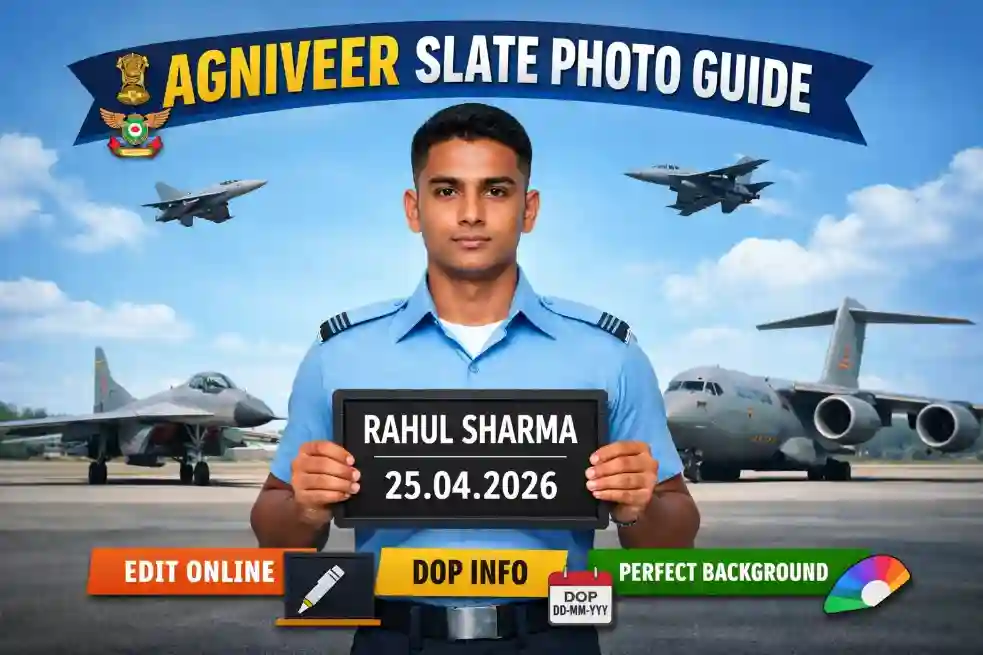
इस photo में candidate camera की तरफ सीधे देखते हुए अपने chest के सामने black slate पकड़ता है। Slate पर candidate का नाम और date of photograph सफेद chalk से CAPITAL LETTERS में साफ लिखा होना चाहिए.
🔍 Current Official Requirements — Slate के लिए
- Physical black slate: photo लेते समय actual slate chest के सामने पकड़ें।
- नाम: White chalk से capital letters में साफ लिखा हो.
- Date of Photograph: जिस दिन photo वास्तव में ली गई वही date लिखें.
- Look straight: camera की तरफ सीधे देखें और relaxed face रखें.
🛠️ Digital Slate Editor अब उपलब्ध है
हमारा free browser-based editor uploaded portrait पर black slate + white chalk-style name + DOP का realistic preview जोड़ सकता है। आप slate को drag, resize और rotate कर सकते हैं; hand-preserve option download के समय hands को slate के ऊपर दिखाने की कोशिश करता है.
महत्वपूर्ण: current Agniveervayu instructions physical black slate पकड़े हुए photograph मांगती हैं। इसलिए digital slate को official physical-slate requirement का replacement न मानें; इसे preparation, preview या उन situations में इस्तेमाल करें जहाँ applicable instructions इसकी अनुमति दें.
ऊपर दिए Live Tool से Name + Date वाला Slate कैसे Add करें?
ऊपर दिए Live Agniveervayu Slate Photo Maker में आप इसी ब्लॉग के अंदर अपनी front-facing portrait photo upload कर सकते हैं। Tool black slate को photo के lower chest area में place करता है और आपके दिए हुए name + DOP को white chalk-style text में render करता है.
🛠️ Tool Workflow
⚠️ Dimension Note
Current 02/2027 source material does not specify a fixed pixel width × height pair. इसलिए 800×1000 जैसे editor dimensions को official requirement न मानें. Final upload से पहले portal/notification में दिखने वाली current instructions ही follow करें.
Agniveervayu Photo कितनी पुरानी हो सकती है?
Intake 02/2027 notification में photograph registration की तारीख से एक महीने से पुरानी नहीं होनी चाहिए। इसलिए “3 months” वाला पुराना rule इस current cycle के लिए सही नहीं है.
🚨 DOP को fake मत करें
DOP वही date होनी चाहिए जिस दिन photo ली गई थी। पुरानी photo पर नई date लिखकर recent photo जैसा दिखाना सही नहीं है. Appearance change भी Phase-I/Phase-II पर candidature को प्रभावित कर सकता है.
Airforce Photo Background Colour 2026 क्या होना चाहिए?
Current notification photo को light background में front portrait बताती है और facemask तथा headgear को अनुमति नहीं देती, Sikhs को exception है.
- Background light और साफ रखें.
- Face camera की तरफ साफ दिखना चाहिए.
- Facemask न पहनें.
- Headgear न पहनें, except where the notification allows the Sikh exception.
⚠️ “White only” को official rule न मानें
Current notice wording light background है। इसलिए किसी एक exact shade को “officially mandatory” कहने से बचें. Final upload के समय live portal instructions follow करें.
Online Registration में Live Image Capture भी है
Current 02/2027 instructions में Candidate's Live Image Capture भी दिया गया है। Registration के दौरान live image capture होगा और system live image के facial features को uploaded passport photograph से match करने की व्यवस्था बताता है.
📷 Live image के समय क्या ध्यान रखें?
Agniveervayu Signature — Current 02/2027 Rule
Candidate को white paper पर black ink pen से अपनी signature करनी है। केवल candidate की signature स्वीकार की जाती है और signature area को ही scan करने को कहा गया है.
✍️ Signature तैयार करने के Steps
👨👩👧 Under-18 Candidates
अगर candidate online application भरने की date पर 18 साल से कम है, तो parent (Father/Mother) या Guardian की signature image भी upload करनी पड़ सकती है। उसकी exact upload instruction current portal/notification से verify करें.
Left Thumb Impression — भूलिए मत
Current 02/2027 notification में Left Thumb Impression Image भी required document के रूप में दिया गया है। Left hand thumb को stamp pad से ink करके plain blank paper पर impression देना है और केवल thumb area scan करना है.
✅ Thumb Impression सही तरह से कैसे लें?
- Left-hand thumb ही use करें.
- Plain blank paper पर clear impression दें.
- सिर्फ impression area scan करें.
- Output को 50–100 KB JPG/JPEG में तैयार करें.
DOP Full Form in Photo Airforce का सही मतलब
DOP = Date of Photograph. यह photo खींचे जाने की actual date है। Slate photo में name और date of photograph साफ दिखना चाहिए. Current rule में photo registration date से एक महीने से पुरानी नहीं होनी चाहिए.
🚨 पुरानी फोटो पर नई DOP मत लगाएं
सिर्फ date बदलने से photo recent नहीं बन जाती। एक fresh photograph लें, physical slate के साथ photo capture करें और वही actual date रखें.
Photo, Signature और Thumb Upload से पहले Final Checklist ✅
📋 Agniveervayu 02/2027 Photo — जाँचें:
- Photo registration date से एक महीने के अंदर की है?
- File size 100 KB से 200 KB के बीच है?
- File format .jpg / .jpeg है?
- Front portrait और face clearly visible है?
- Background light है?
- Facemask नहीं है?
- Headgear नहीं है, except applicable Sikh exception?
- Candidate ने actual black slate chest के सामने पकड़ी है?
- नाम और date white chalk में CAPITAL LETTERS में readable हैं?
- Live image capture के लिए camera ready है?
✍️ Candidate Signature — जाँचें:
- White paper पर black ink से की गई है?
- Signature केवल candidate की है?
- सिर्फ signature area scan/capture किया है?
- File size 80 KB से 150 KB के बीच है?
- Format .jpg / .jpeg है?
👍 Left Thumb — जाँचें:
- Left hand thumb का impression है?
- Plain blank paper पर clear impression है?
- सिर्फ thumb area scan किया है?
- File size 50 KB से 100 KB के बीच है?
- Format .jpg / .jpeg है?
✅ सभी files current notification और live portal preview से cross-check करें. कोई third-party tool acceptance guarantee नहीं करता.
Common Mistakes — इन गलतियों से बचें
⚠️ ये mistakes application upload में problem कर सकती हैं
1. पुराने 10–50 KB rule का उपयोग करना
02/2027 में photo, signature और thumb की ranges अलग हैं. Current ranges ही follow करें.
2. Physical slate के बिना photo तैयार करना
Notification photo लेते समय actual black slate की बात करती है. Digital slate को substitute न मानें.
3. Photo को registration से बहुत पहले लेना
Current notice photo को registration date से एक महीने के अंदर का बताती है.
4. गलत document upload करना
Photo, signature और left thumb को सही upload field में ही डालें.
5. Signature का पूरा page scan करना
Notification signature area only scan करने को कहती है.
6. Thumb की जगह right thumb upload करना
Current instruction में left hand thumb impression लिखा है.
7. Fake DOP लगाना
Slate पर actual photograph date ही रखें. Date बदलने से old photo recent नहीं हो जाती.
Agniveervayu Upload Tool — अभी इस्तेमाल करें
Photo 100–200KB · Signature 80–150KB · Left Thumb 50–100KB · JPG/JPEG output
⚡ Upload / Resize Tool खोलेंReal-slate photo only · Browser processing · कोई login नहीं
Official Notification और Portal
Current official application instructions iafrecruitment.edcil.co.in portal पर दी गई हैं। Detailed document rules के लिए Intake 02/2027 advertisement देखें.
🔗 Official Reference
Conclusion
Agniveervayu Intake 02/2027 के लिए पुराने 10–50 KB tool data को follow न करें। Current 02/2027 instructions के हिसाब से:
- Photo: 100–200 KB, JPG/JPEG, light background, physical black slate, name + date.
- Signature: 80–150 KB, JPG/JPEG, black ink on white paper.
- Left Thumb: 50–100 KB, JPG/JPEG, left-hand thumb impression.
- Recency: Photo registration date से one month के अंदर की हो.
- Live capture: Online registration के दौरान live image capture step भी है.
🎯 Agniveervayu Photo — Name + DOP Slate Preview तैयार करें
Digital slate preview · 100–200 KB photo · Signature 80–150 KB · Left Thumb 50–100 KB · JPG/JPEG
⚡ Live Slate Tool — मुफ्त ↗ Full-Screen Tool 🏠 FatafatResize.in — सभी Defence Exam Tools →🌟 Agniveervayu Aspirants के लिए शुभकामनाएं!
Final upload से पहले current notification, candidate preview और live portal instructions को एक बार जरूर check करें.